> ## Documentation Index
> Fetch the complete documentation index at: https://docs.unifygtm.com/llms.txt
> Use this file to discover all available pages before exploring further.
# Play actions
> Actions are the building blocks of Unify Plays.
## Overview
Plays chain together actions to perform anything from simple automations to
complex and dynamic outbound campaigns. Below are the actions you can choose
from when creating a Play.
## Core actions
### AI Agent qualification
AI Agents are powerful tools for researching companies or people and answering
questions about them. In Plays, the answers provided by an Agent can be used to
determine whether a company or person is qualified or not.
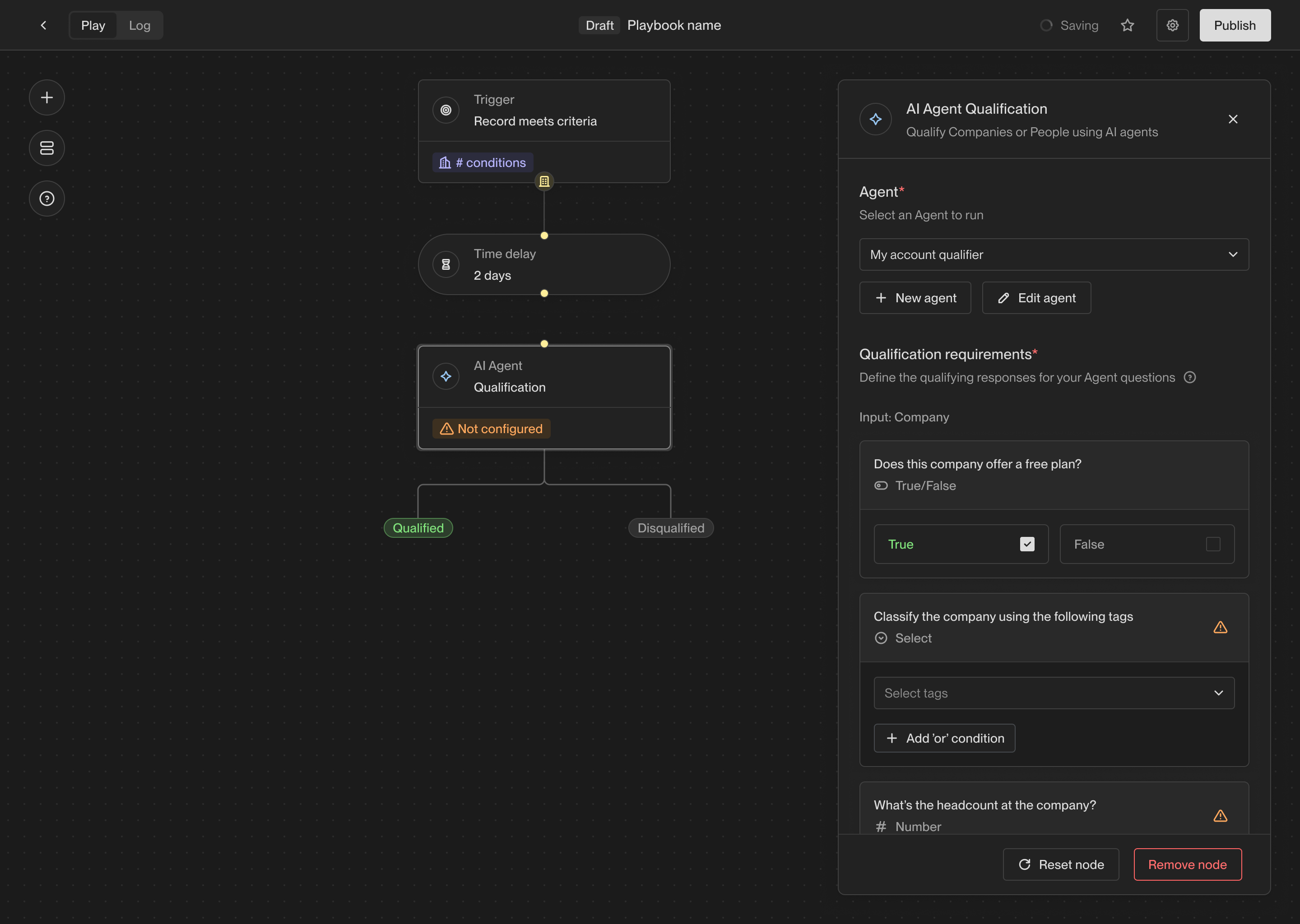
When you select the Agent qualification action, you will be able to choose an
existing Agent or create a new one. Every Agent has a set of questions that it
will answer about the given record. In the action configuration panel, you can
select which answers are required for the record to be considered qualified.
 ### Assign owner
The owner assignment action allows you to assign a record to a specific owner in
Unify. Every company and person record in Unify has an owner, and this action
allows you to set or change the owner of a record.
### Assign owner
The owner assignment action allows you to assign a record to a specific owner in
Unify. Every company and person record in Unify has an owner, and this action
allows you to set or change the owner of a record.
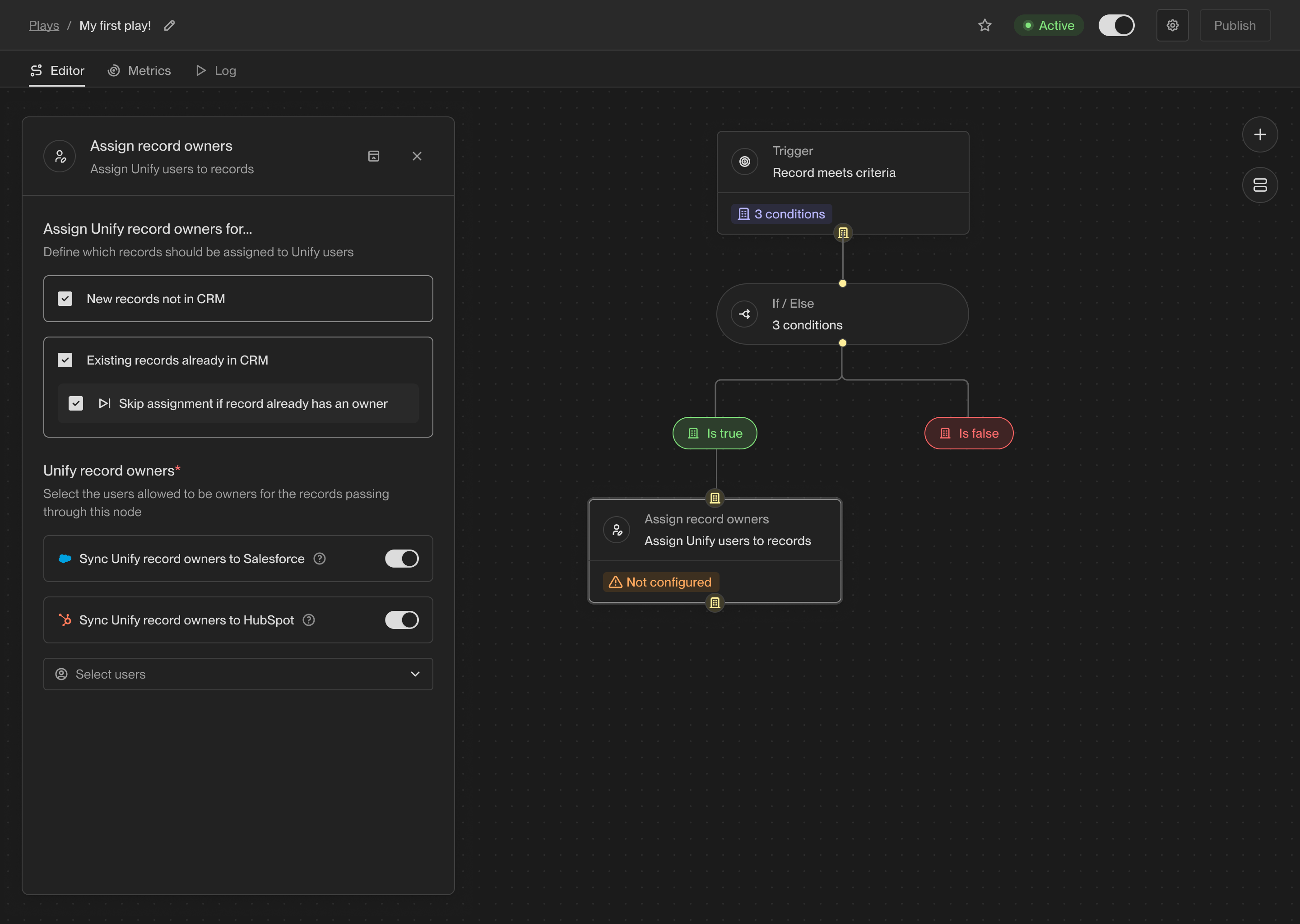 When you connect a CRM to Unify, the owner of the corresponding records in the
CRM will be synced into Unify. For records that don't yet have an owner or don't
yet exist in the CRM, you can use this action to assign an owner. You can also
choose to update the owner if desired.
### Prospect
One of the most common use cases for Plays is to find new people to reach out
to. The prospecting action takes a company record as input and returns a list of
people at that company matching specific personas and criteria.
When you select the prospecting action, you can specify one or more personas to
search for. The personas are considered in order, so the first persona will be
preferred over the second, then each subsequent persona.
When you connect a CRM to Unify, the owner of the corresponding records in the
CRM will be synced into Unify. For records that don't yet have an owner or don't
yet exist in the CRM, you can use this action to assign an owner. You can also
choose to update the owner if desired.
### Prospect
One of the most common use cases for Plays is to find new people to reach out
to. The prospecting action takes a company record as input and returns a list of
people at that company matching specific personas and criteria.
When you select the prospecting action, you can specify one or more personas to
search for. The personas are considered in order, so the first persona will be
preferred over the second, then each subsequent persona.
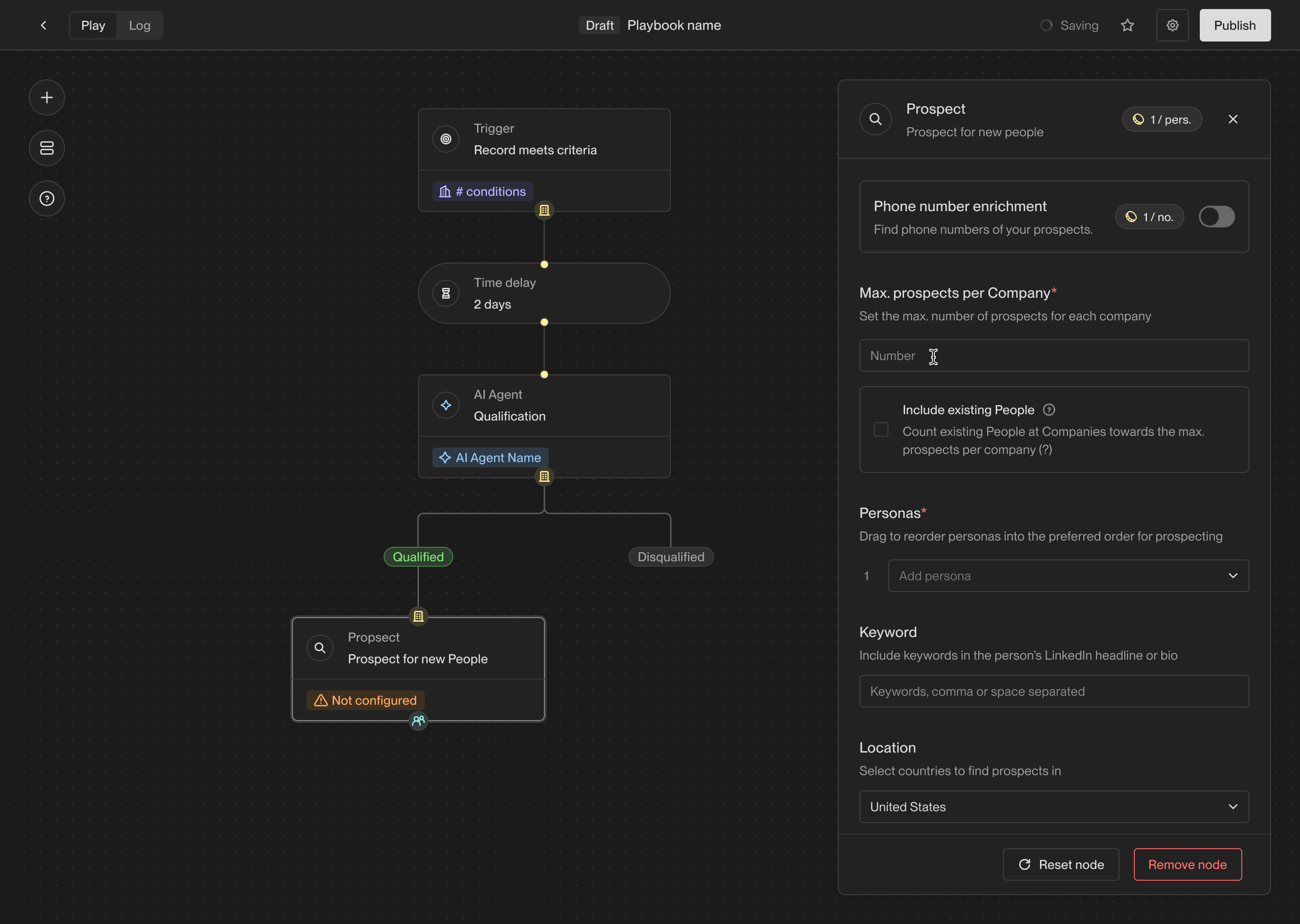 You can also specify a limit on the number of people to find per company. The
limit must be between 1 and 10.
#### Prospecting methods
The prospecting method determines whether Unify should use people that already
exist in Unify or your CRM, pull fresh contact data, or do both.
| Method | Behavior | Credit usage |
| ------------------------------- | --------------------------------------------------------------------------------------------------------------------------------------- | -------------------------------------------------------------------------------------------- |
| **Prioritize existing records** | Adds matching existing people first, then uses Unify prospecting data to find additional people until the per-company limit is reached. | Credits are charged only for new people found from Unify prospecting. |
| **Find the best matches** | Uses Unify prospecting data for every person so Unify can return the freshest matching records. | Credits are charged for every person added, even if they already exist in Unify or your CRM. |
| **Find new people only** | Excludes existing people and only returns net-new people. | Credits are charged for every person added. |
Unify prospecting uses 2 credits per person. If credits are exhausted, the
action cannot find net-new people. If **Prioritize existing records** is
selected, the action can still return matching existing people.
#### Persona order and filters
Personas are matched in the order shown in the action. Drag personas to set the
preferred order. You can select up to five personas in one Prospect action.
Optional filters refine the search:
* **Phone enrichment** attempts to enrich phone numbers for returned people.
* **Keywords** search information associated with prospects and rank matching prospects higher.
* **Countries** only return people located in selected countries.
The Prospect action returns a list of people. To enroll those people in
Sequences, connect the Prospect action to a **Sequence** action and configure
persona routing there.
### Sequence
The sequence enrollment action makes building automated outbound campaigns
easier than ever. You can choose which sequences to send people to based on
which personas they match.
You can also specify a limit on the number of people to find per company. The
limit must be between 1 and 10.
#### Prospecting methods
The prospecting method determines whether Unify should use people that already
exist in Unify or your CRM, pull fresh contact data, or do both.
| Method | Behavior | Credit usage |
| ------------------------------- | --------------------------------------------------------------------------------------------------------------------------------------- | -------------------------------------------------------------------------------------------- |
| **Prioritize existing records** | Adds matching existing people first, then uses Unify prospecting data to find additional people until the per-company limit is reached. | Credits are charged only for new people found from Unify prospecting. |
| **Find the best matches** | Uses Unify prospecting data for every person so Unify can return the freshest matching records. | Credits are charged for every person added, even if they already exist in Unify or your CRM. |
| **Find new people only** | Excludes existing people and only returns net-new people. | Credits are charged for every person added. |
Unify prospecting uses 2 credits per person. If credits are exhausted, the
action cannot find net-new people. If **Prioritize existing records** is
selected, the action can still return matching existing people.
#### Persona order and filters
Personas are matched in the order shown in the action. Drag personas to set the
preferred order. You can select up to five personas in one Prospect action.
Optional filters refine the search:
* **Phone enrichment** attempts to enrich phone numbers for returned people.
* **Keywords** search information associated with prospects and rank matching prospects higher.
* **Countries** only return people located in selected countries.
The Prospect action returns a list of people. To enroll those people in
Sequences, connect the Prospect action to a **Sequence** action and configure
persona routing there.
### Sequence
The sequence enrollment action makes building automated outbound campaigns
easier than ever. You can choose which sequences to send people to based on
which personas they match.
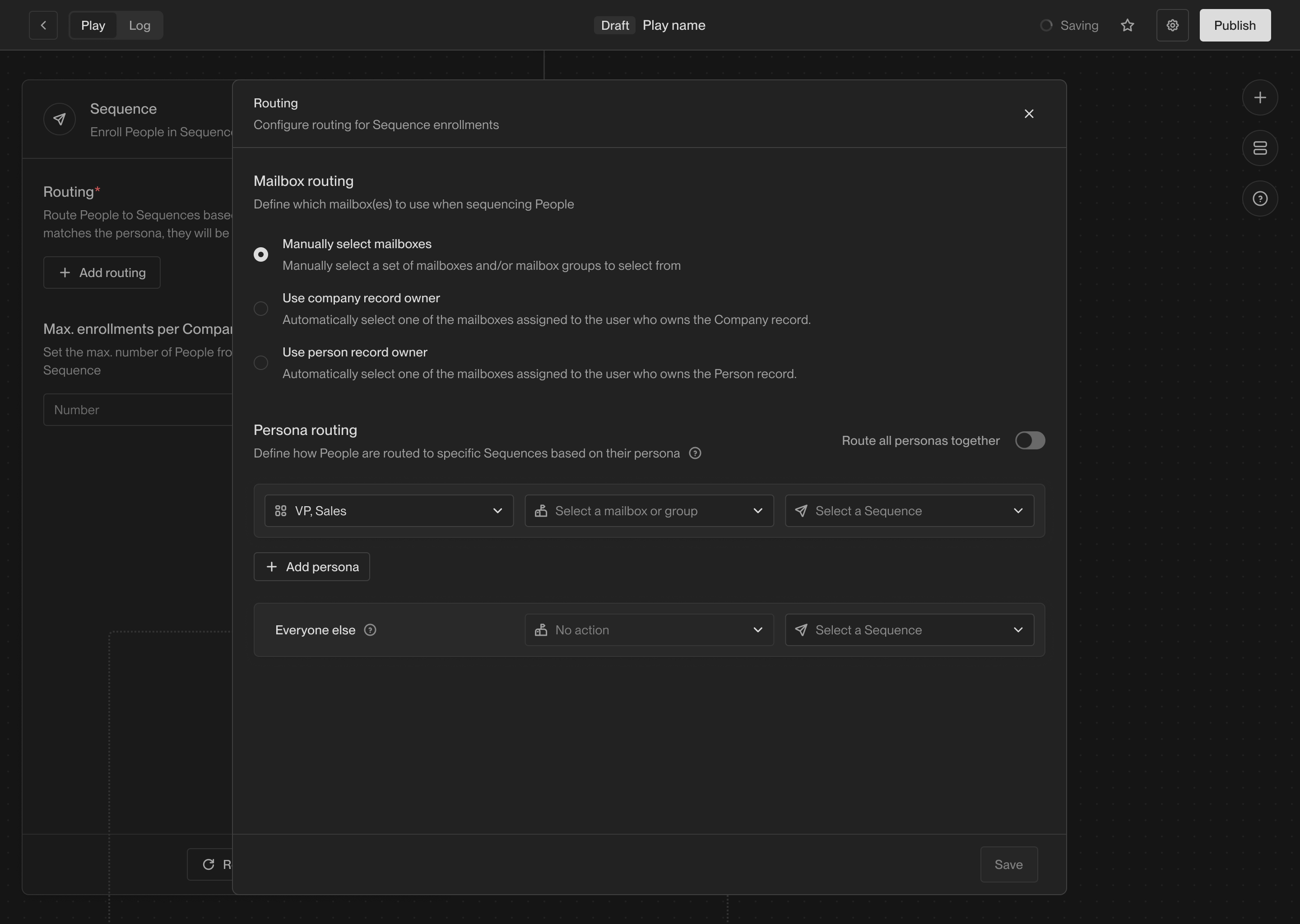
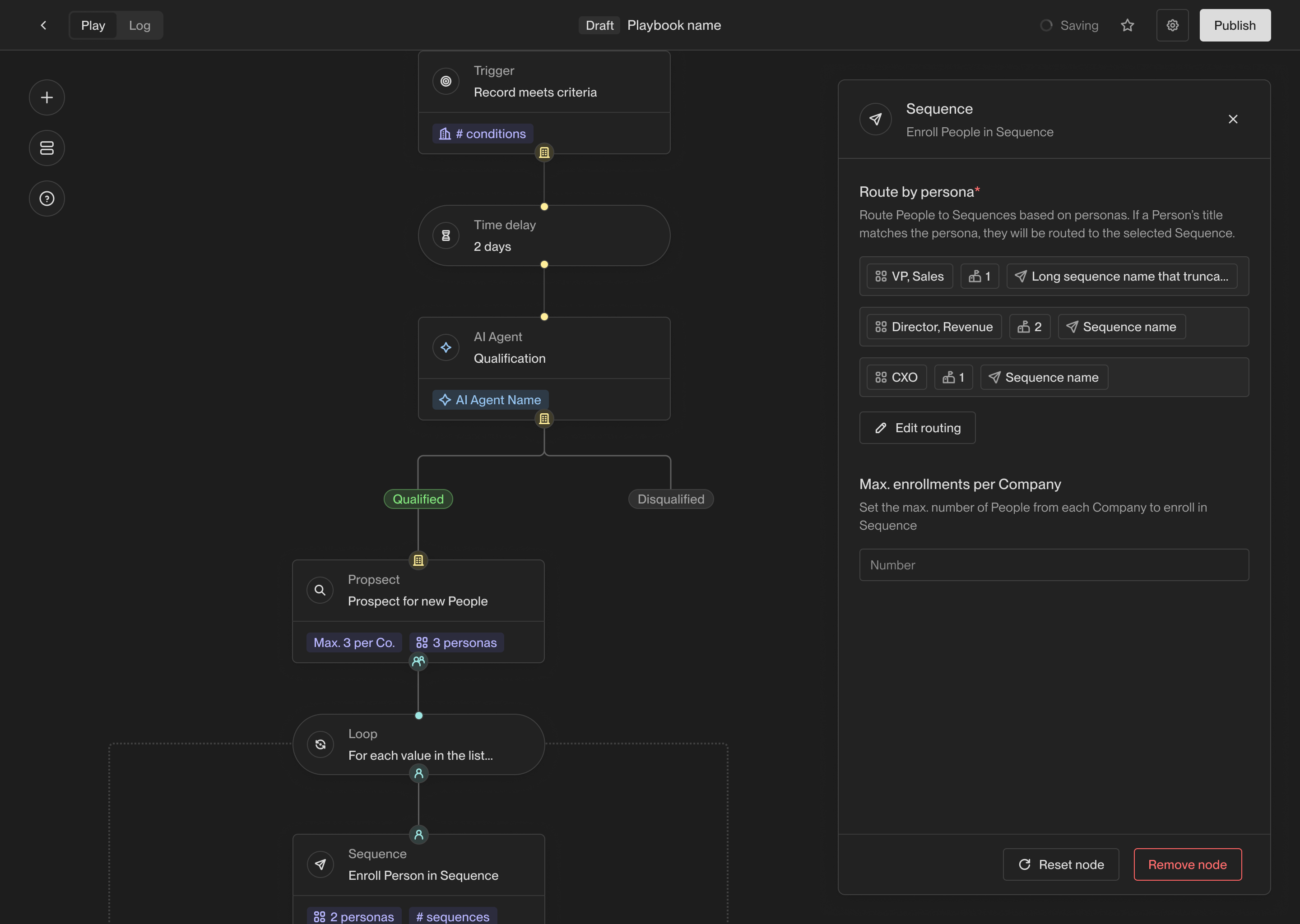 The routing configuration provides a way to specify which mailboxes and
Sequences should be used for people this action runs on. You can route by
persona, send everyone to one Sequence, or add an **Everyone else** route for
people who do not match a configured persona.
The routing configuration provides a way to specify which mailboxes and
Sequences should be used for people this action runs on. You can route by
persona, send everyone to one Sequence, or add an **Everyone else** route for
people who do not match a configured persona.
 #### Persona routing
For persona routes, Unify compares the person's title to each configured
persona in order. The first matching persona determines which Sequence and
mailbox route is used. If **Route all personas together** is enabled, every
configured persona uses the same Sequence and mailbox route.
If the Play has an upstream Prospect action, Unify can detect prospect personas
that are not yet routed and offer **Add prospect personas** in the Sequence
configuration.
The optional **Everyone else** route catches people who do not match any
configured persona. If there is no matching persona route and no **Everyone
else** route, the action skips that person because there is no routing target.
#### Mailbox routing
For each route, choose how Unify should select the sending mailbox:
| Routing option | Behavior |
| ----------------------------- | ------------------------------------------------------------- |
| **Manually select mailboxes** | Select specific mailboxes or mailbox groups for that route. |
| **Use Person record owner** | Use a mailbox assigned to the Person's Unify owner. |
| **Use Company record owner** | Use a mailbox assigned to the Person's Company's Unify owner. |
When owner-based routing is selected, you must also select fallback mailboxes.
Unify uses the fallback mailboxes if the record is unowned or if the owner does
not have an eligible mailbox.
Only eligible mailboxes are used. A mailbox must be assigned to an active user,
not deleted, not paused, and eligible to send. Unify Email Delivery mailboxes
must be warm or explicitly marked warm; Gmail mailboxes do not require Unify
warmup.
#### Enrollment limits and skips
You also have the option to set **Max. enrollments per Company**, which is
generally recommended to avoid over-targeting a single company. This limit
checks active Sequence enrollments for people at the same company across all
Plays in Unify. If the company already has that many active enrollments, the
action skips additional people from that company.
The Sequence action can also skip a person when:
* The person is already enrolled in a Sequence that prevents another enrollment.
* The selected Sequence has been deleted or has no published version.
* No route matches the person and there is no **Everyone else** route.
* No eligible mailbox can be selected for the route.
See [Sequence enrollments](/reference/sequences/enrollments) for more detail on
enrollment lifecycle and eligibility.
### Slack alert
The Slack alert action allows you to send a customized Slack message at any
point in a Play. You can send messages to any public channels or DM any users in
your workspace.
#### Persona routing
For persona routes, Unify compares the person's title to each configured
persona in order. The first matching persona determines which Sequence and
mailbox route is used. If **Route all personas together** is enabled, every
configured persona uses the same Sequence and mailbox route.
If the Play has an upstream Prospect action, Unify can detect prospect personas
that are not yet routed and offer **Add prospect personas** in the Sequence
configuration.
The optional **Everyone else** route catches people who do not match any
configured persona. If there is no matching persona route and no **Everyone
else** route, the action skips that person because there is no routing target.
#### Mailbox routing
For each route, choose how Unify should select the sending mailbox:
| Routing option | Behavior |
| ----------------------------- | ------------------------------------------------------------- |
| **Manually select mailboxes** | Select specific mailboxes or mailbox groups for that route. |
| **Use Person record owner** | Use a mailbox assigned to the Person's Unify owner. |
| **Use Company record owner** | Use a mailbox assigned to the Person's Company's Unify owner. |
When owner-based routing is selected, you must also select fallback mailboxes.
Unify uses the fallback mailboxes if the record is unowned or if the owner does
not have an eligible mailbox.
Only eligible mailboxes are used. A mailbox must be assigned to an active user,
not deleted, not paused, and eligible to send. Unify Email Delivery mailboxes
must be warm or explicitly marked warm; Gmail mailboxes do not require Unify
warmup.
#### Enrollment limits and skips
You also have the option to set **Max. enrollments per Company**, which is
generally recommended to avoid over-targeting a single company. This limit
checks active Sequence enrollments for people at the same company across all
Plays in Unify. If the company already has that many active enrollments, the
action skips additional people from that company.
The Sequence action can also skip a person when:
* The person is already enrolled in a Sequence that prevents another enrollment.
* The selected Sequence has been deleted or has no published version.
* No route matches the person and there is no **Everyone else** route.
* No eligible mailbox can be selected for the route.
See [Sequence enrollments](/reference/sequences/enrollments) for more detail on
enrollment lifecycle and eligibility.
### Slack alert
The Slack alert action allows you to send a customized Slack message at any
point in a Play. You can send messages to any public channels or DM any users in
your workspace.
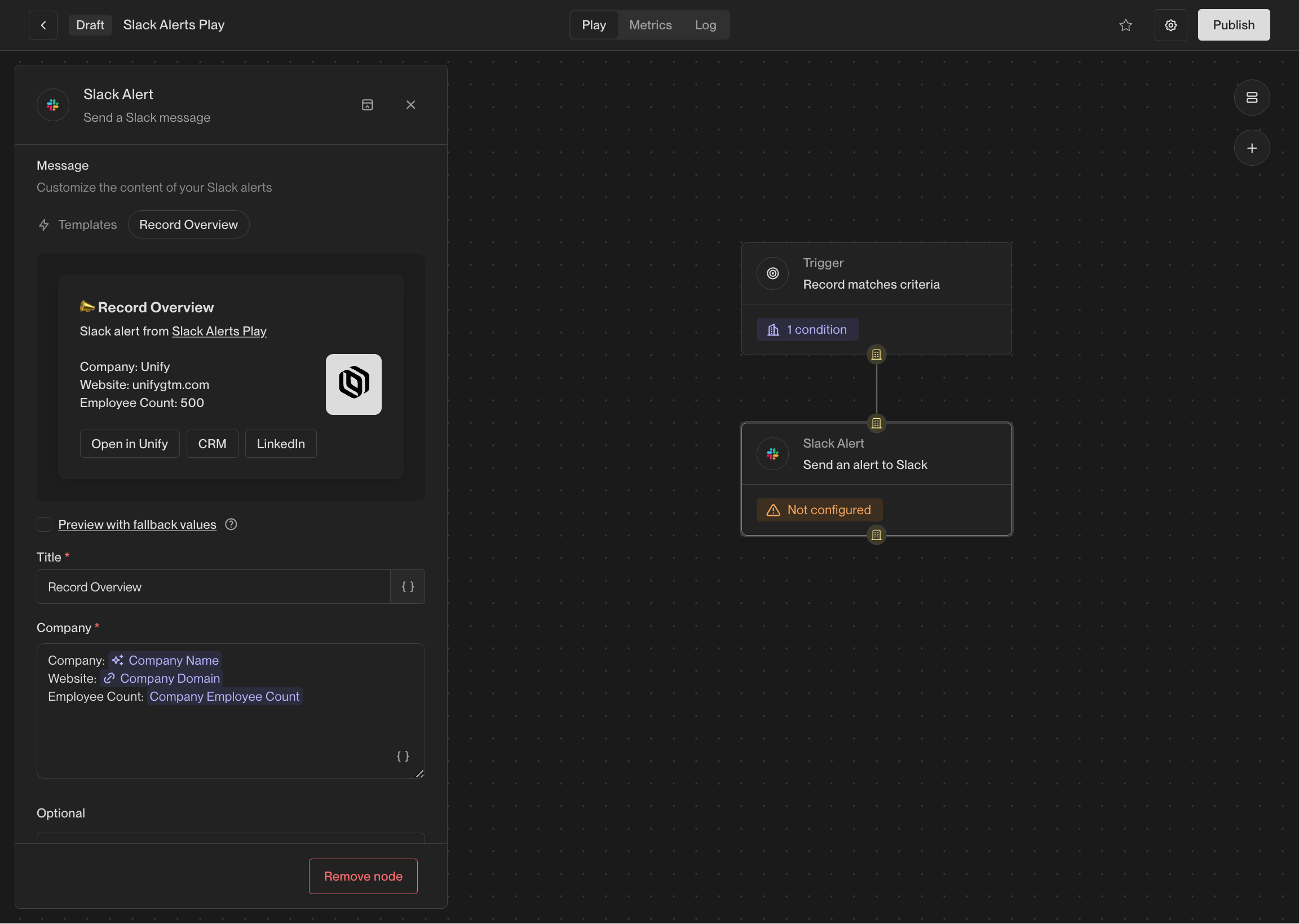 The contents of the messages can be customized with template variables, so you
can include information about the record that triggered the action.
If the value for a template variable is missing, the message will still be sent,
but the variable will be replaced with `Unknown`.
You may optionally tag the owner of the account (e.g. `@John Doe`), so they can
be easily notified of the alert. You can also include intent signal information
containing recent website visitors, G2 page views, and more.
This action is available when Slack connected to Unify. See the [Slack integration guide](/reference/integrations/slack)
for information on integrating Slack with Unify.
### Sync to HubSpot
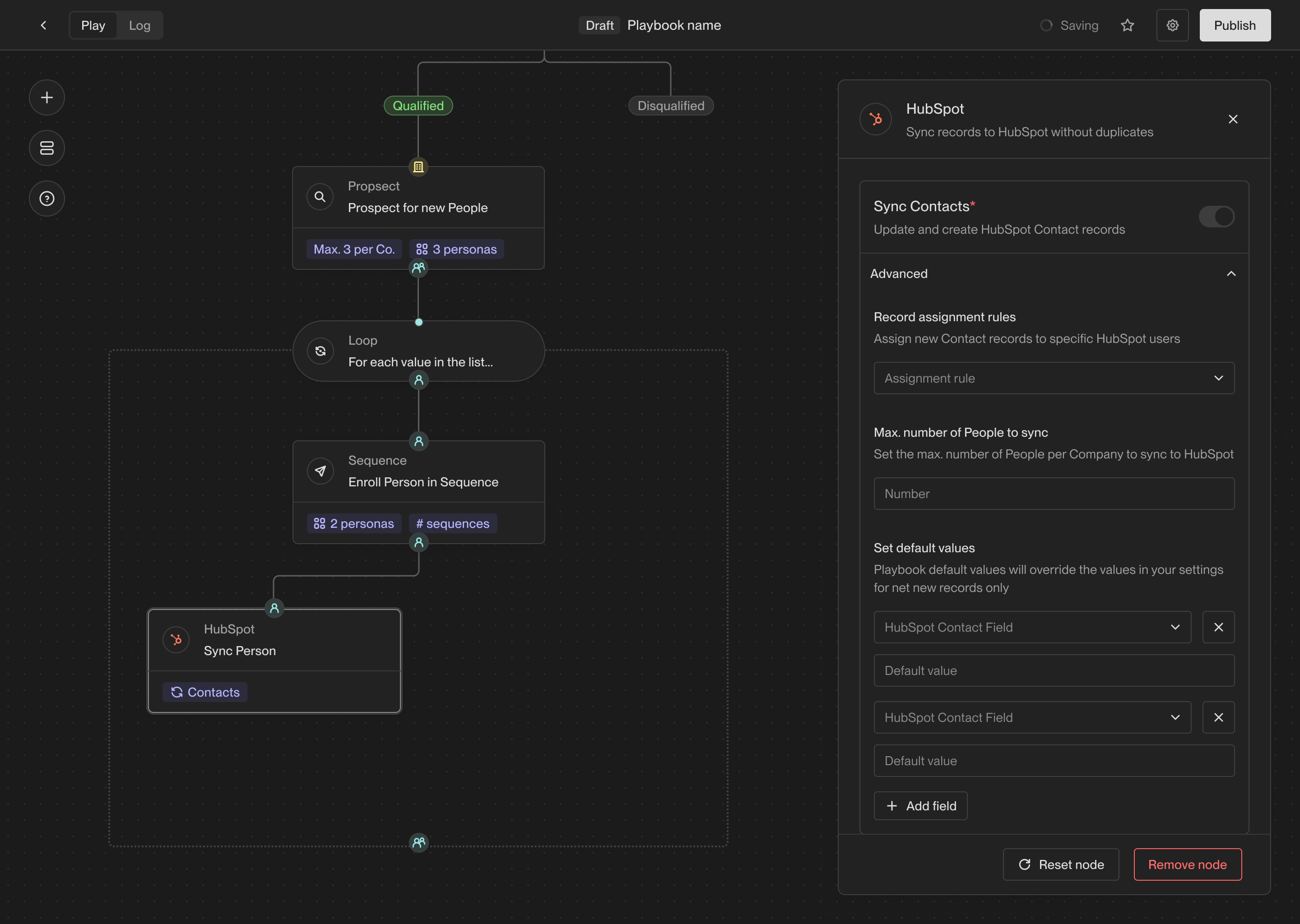
The HubSpot sync action allows you to create or update a record in HubSpot based
on a company or person record in Unify. This action will use the settings you've
configured for HubSpot in the Unify settings.
You also have the option to specify additional default field values. These will
be written to HubSpot unless a different Unify field is already mapped to the
HubSpot field.
The contents of the messages can be customized with template variables, so you
can include information about the record that triggered the action.
If the value for a template variable is missing, the message will still be sent,
but the variable will be replaced with `Unknown`.
You may optionally tag the owner of the account (e.g. `@John Doe`), so they can
be easily notified of the alert. You can also include intent signal information
containing recent website visitors, G2 page views, and more.
This action is available when Slack connected to Unify. See the [Slack integration guide](/reference/integrations/slack)
for information on integrating Slack with Unify.
### Sync to HubSpot
The HubSpot sync action allows you to create or update a record in HubSpot based
on a company or person record in Unify. This action will use the settings you've
configured for HubSpot in the Unify settings.
You also have the option to specify additional default field values. These will
be written to HubSpot unless a different Unify field is already mapped to the
HubSpot field.
 ### Sync to Salesforce
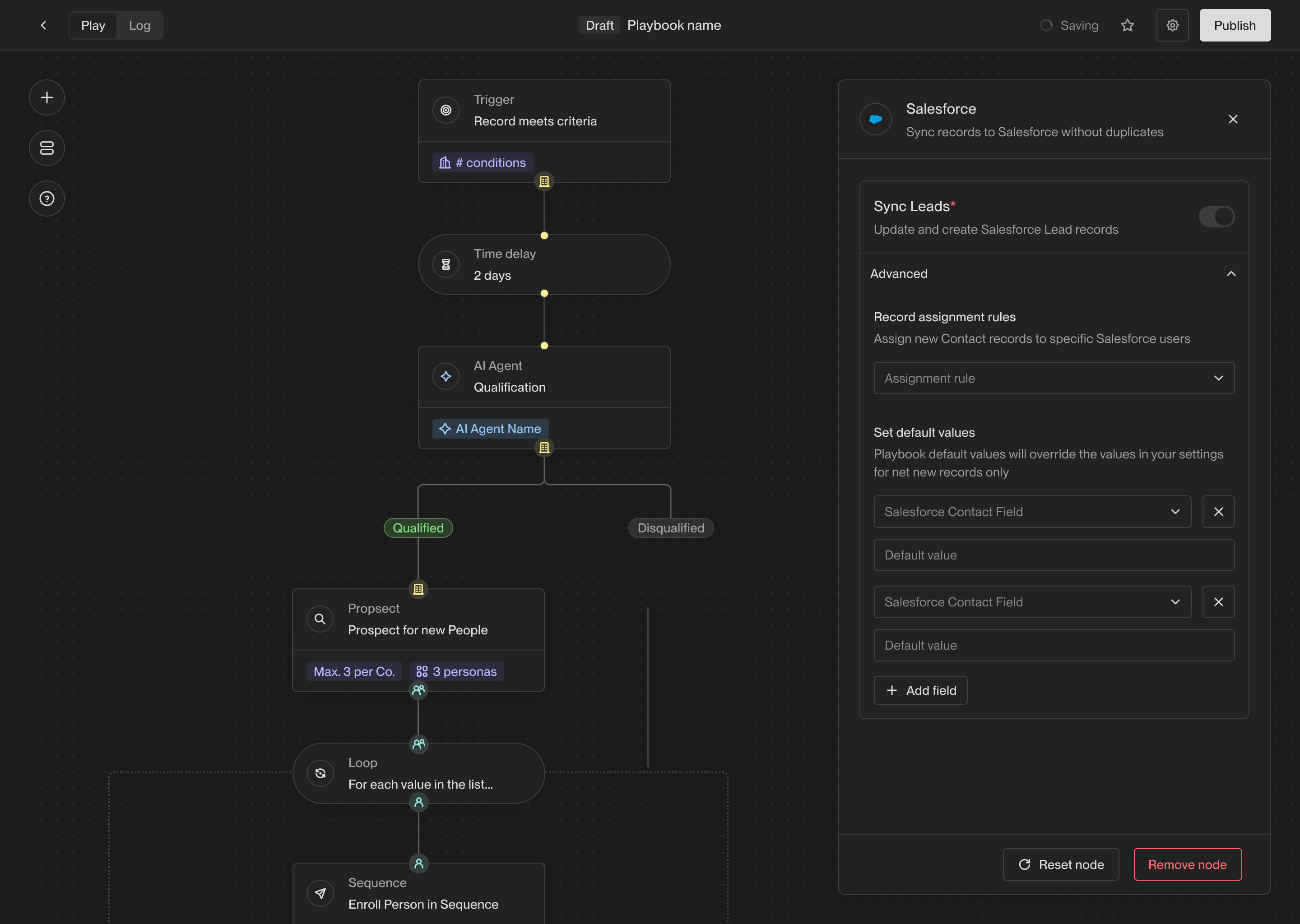
The Salesforce sync action allows you to create or update a record in Salesforce
based on a company or person record in Unify. This action will use the settings
you've configured for Salesforce in the Unify settings.
You also have the option to specify additional default field values. These will
be written to Salesforce unless a different Unify field is already mapped to the
Salesforce field.
### Sync to Salesforce
The Salesforce sync action allows you to create or update a record in Salesforce
based on a company or person record in Unify. This action will use the settings
you've configured for Salesforce in the Unify settings.
You also have the option to specify additional default field values. These will
be written to Salesforce unless a different Unify field is already mapped to the
Salesforce field.
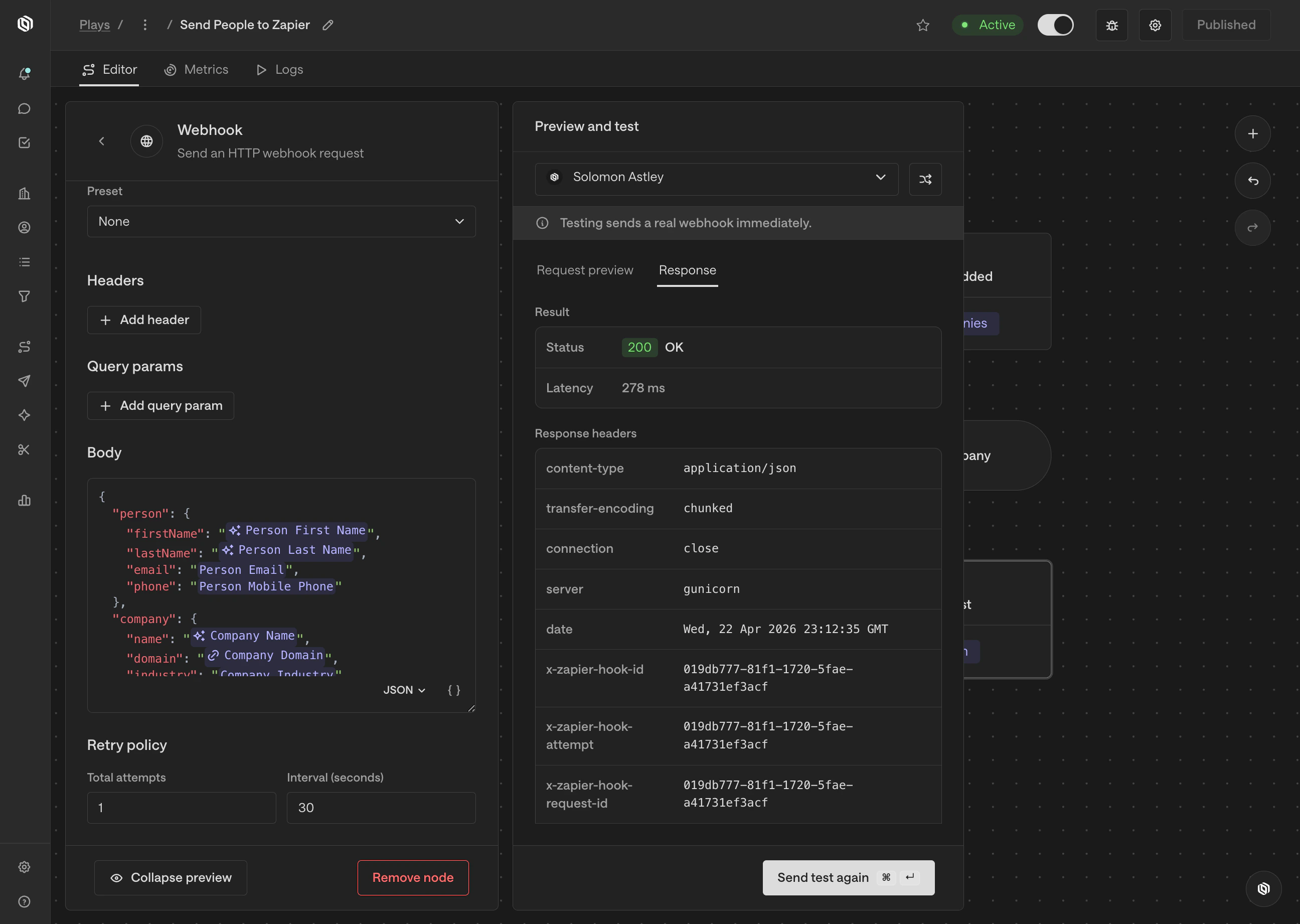
 ### Webhook
The webhook action allows you to send an HTTP request to any URL with
configurable options and a custom payload. This can be used to integrate with
any tool that accepts webhooks, such as Zapier, n8n, or internal tooling.
Here are the available configuration options:
| Option | Description |
| ------------------ | ----------------------------------------------------------------------------------- |
| **URL** | The URL to send the request to. |
| **Method** | The HTTP method to use (e.g. GET, POST, etc.). |
| **Authentication** | The authentication method to use, if any (e.g. Basic Auth, Bearer Token, etc.). |
| **Headers** | Any custom headers to include in the request. |
| **Query params** | Any custom query parameters to include in the request URL. |
| **Body** | The body of the request, which can be customized with template variables. |
| **Retry policy** | The number of retries to attempt if the request fails and the time between retries. |
### Webhook
The webhook action allows you to send an HTTP request to any URL with
configurable options and a custom payload. This can be used to integrate with
any tool that accepts webhooks, such as Zapier, n8n, or internal tooling.
Here are the available configuration options:
| Option | Description |
| ------------------ | ----------------------------------------------------------------------------------- |
| **URL** | The URL to send the request to. |
| **Method** | The HTTP method to use (e.g. GET, POST, etc.). |
| **Authentication** | The authentication method to use, if any (e.g. Basic Auth, Bearer Token, etc.). |
| **Headers** | Any custom headers to include in the request. |
| **Query params** | Any custom query parameters to include in the request URL. |
| **Body** | The body of the request, which can be customized with template variables. |
| **Retry policy** | The number of retries to attempt if the request fails and the time between retries. |
 ## Utility actions
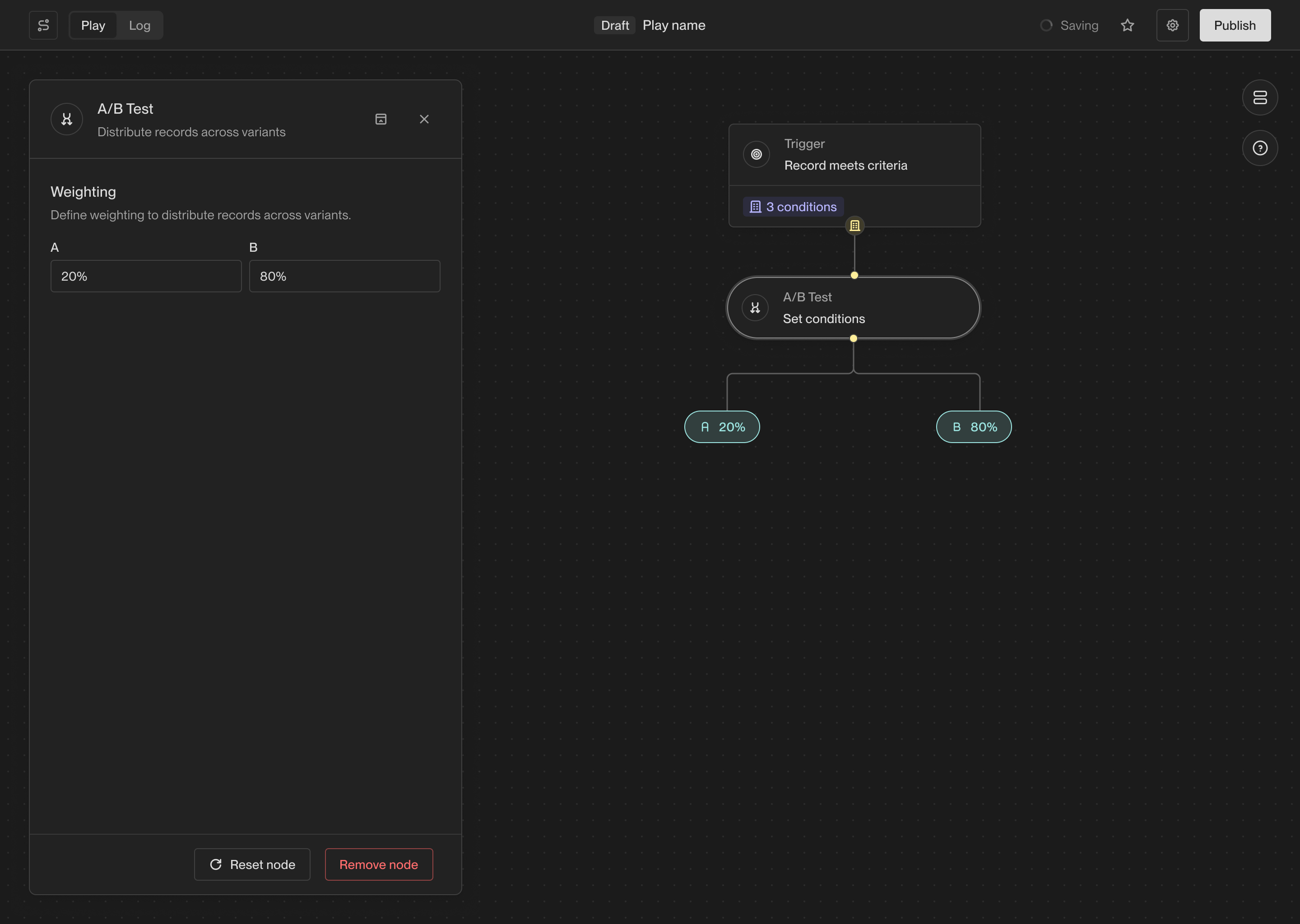
### A/B test
The A/B test action allows you to route records down a specific path based on a
set probability. This is useful for testing different sequences or actions.
## Utility actions
### A/B test
The A/B test action allows you to route records down a specific path based on a
set probability. This is useful for testing different sequences or actions.
 ### Delay
The Delay action waits for a specified amount of time before continuing to the
next action in a Play. This can be useful for spacing out actions in a Play and
ensuring that actions are performed at the right time.
### Delay
The Delay action waits for a specified amount of time before continuing to the
next action in a Play. This can be useful for spacing out actions in a Play and
ensuring that actions are performed at the right time.
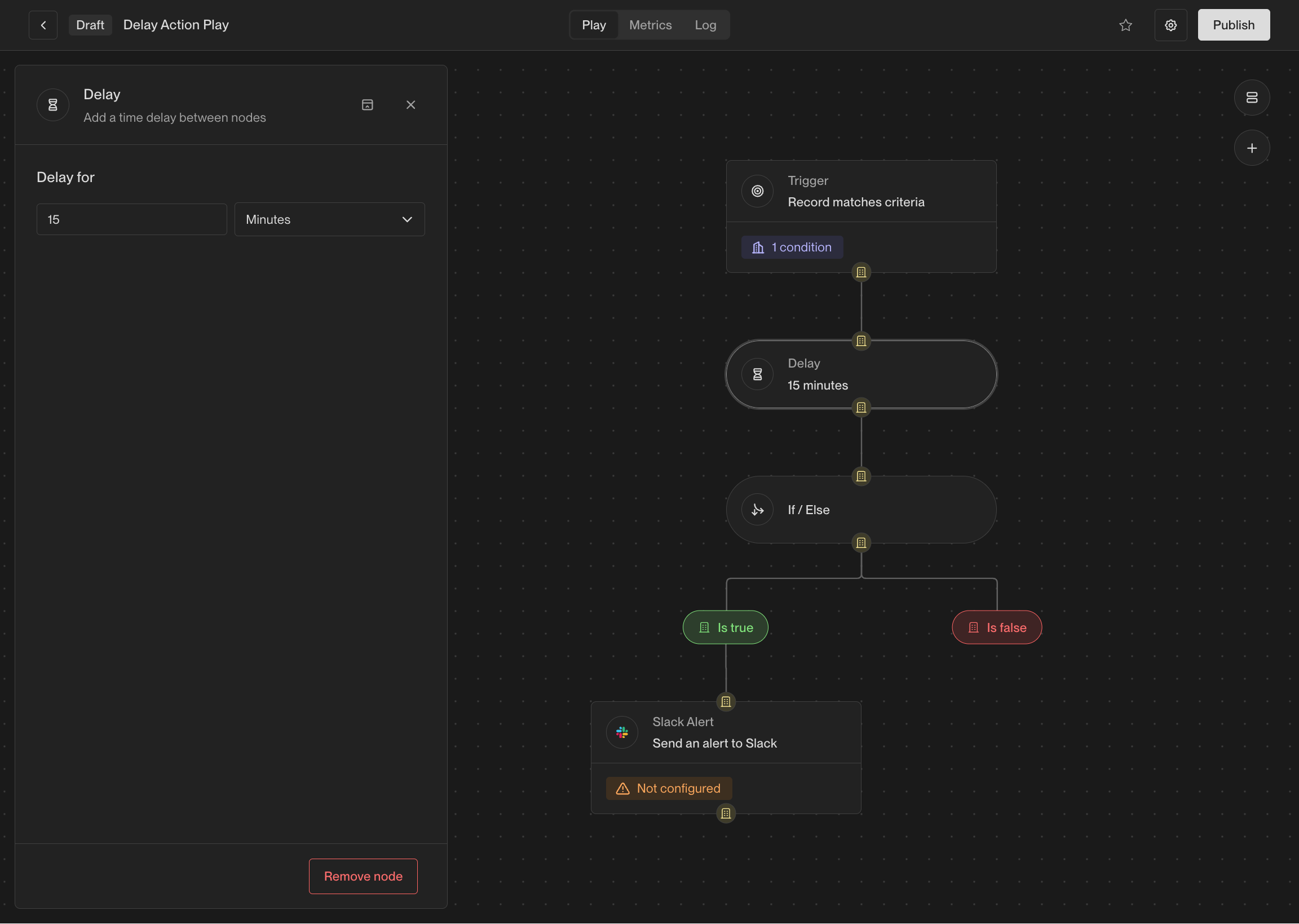 This action is particularly useful when combined with if-else actions. For
example, when a person visits your website, it can be useful to wait a few
minutes before taking action to see which pages they visit or whether they fill
out a form.
### Get Company
If you have a person record, you can use this action to fetch the company that
the person works at. If the person does not have a company associated with them,
this action will not return any result.
### Get People
If you have a company record, you can use this action to fetch people that work
at the company. Unlike the **Prospect for new People** action, this action only
looks for people that already exist in Unify rather than prospecting for new
people.
### If / Else
The if-else action creates a branch in a Play, evaluates some conditions for
records, and sends them down a specific path based on the result. This allows
you to perform different actions on different records based on criteria that you
specify.
This action is particularly useful when combined with if-else actions. For
example, when a person visits your website, it can be useful to wait a few
minutes before taking action to see which pages they visit or whether they fill
out a form.
### Get Company
If you have a person record, you can use this action to fetch the company that
the person works at. If the person does not have a company associated with them,
this action will not return any result.
### Get People
If you have a company record, you can use this action to fetch people that work
at the company. Unlike the **Prospect for new People** action, this action only
looks for people that already exist in Unify rather than prospecting for new
people.
### If / Else
The if-else action creates a branch in a Play, evaluates some conditions for
records, and sends them down a specific path based on the result. This allows
you to perform different actions on different records based on criteria that you
specify.
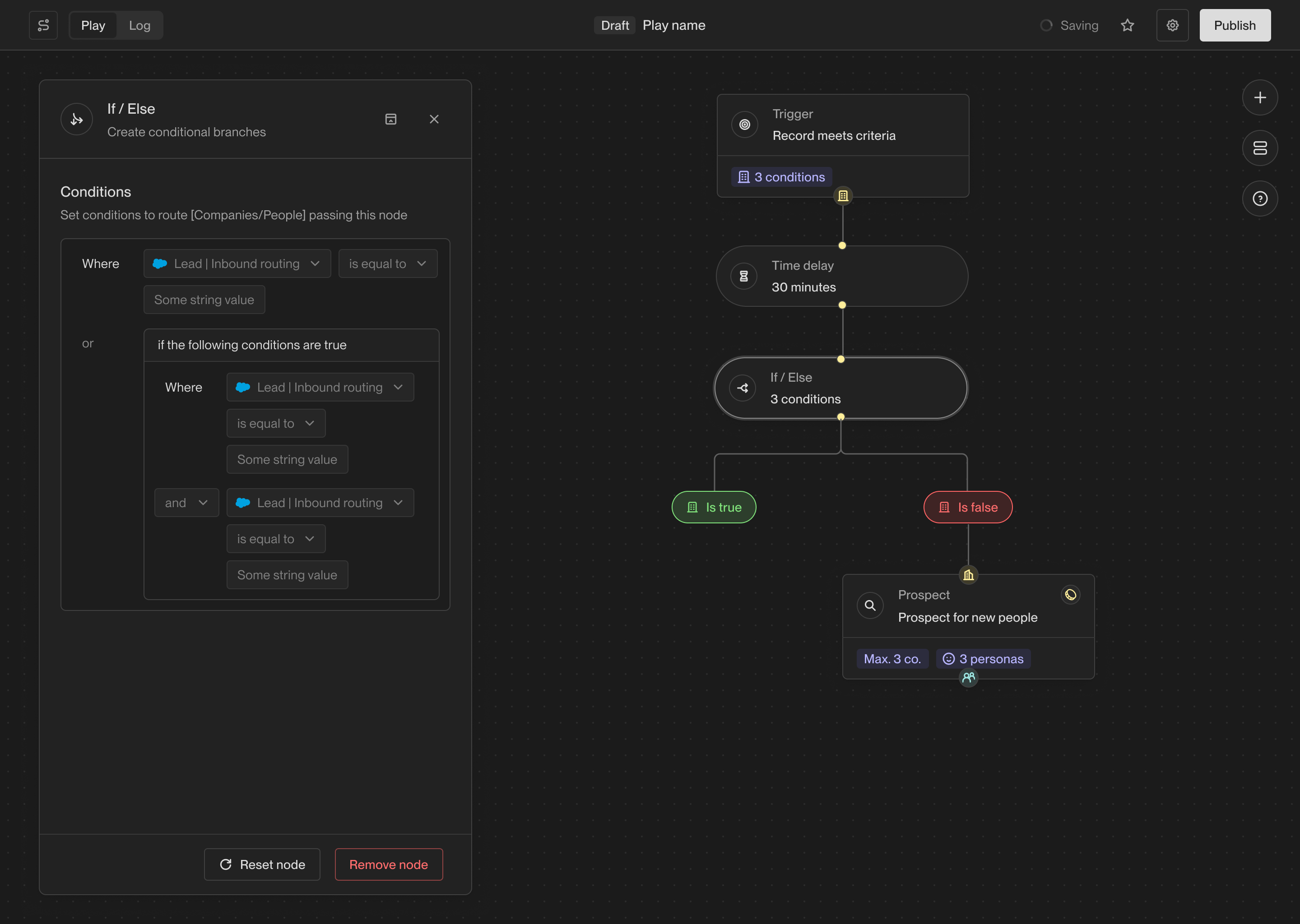 This action enables you to solve a wide variety of more complex use cases using
Plays. For example, you can enroll people into different sequences based on
their company firmographics, exact job title, or custom CRM field values.
## Coming soon
There are lots of additional actions in the works including more powerful AI
features and deep integrations with third-party tools. If you're interested in
an action that isn't available yet, [let us know](mailto:support@unifygtm.com)!
We'll get you in the beta as soon as it's ready.
This action enables you to solve a wide variety of more complex use cases using
Plays. For example, you can enroll people into different sequences based on
their company firmographics, exact job title, or custom CRM field values.
## Coming soon
There are lots of additional actions in the works including more powerful AI
features and deep integrations with third-party tools. If you're interested in
an action that isn't available yet, [let us know](mailto:support@unifygtm.com)!
We'll get you in the beta as soon as it's ready.