> ## Documentation Index
> Fetch the complete documentation index at: https://docs.unifygtm.com/llms.txt
> Use this file to discover all available pages before exploring further.
# Field mappings
> Understand how to configure and use HubSpot field mappings in Unify.
## Overview
Unify can sync data between HubSpot objects and Unify objects. However, the
exact fields in HubSpot differ from Unify, so Unify needs to understand how to
sync data between the two systems. This is done using *field mappings*.
## Setup
### Change field mappings
When you first connect your HubSpot instance, Unify will automatically prepare
the field mappings for you. If you use any custom properties in place of
default HubSpot properties, you may want to update the mappings before Unify
starts syncing data.
In the [HubSpot integration settings](https://app.unifygtm.com/dashboard/settings/integrations/hubspot),
look for the **Company** and **Person** field mappings at
the bottom of the page. Select one to view and edit the field configuration.
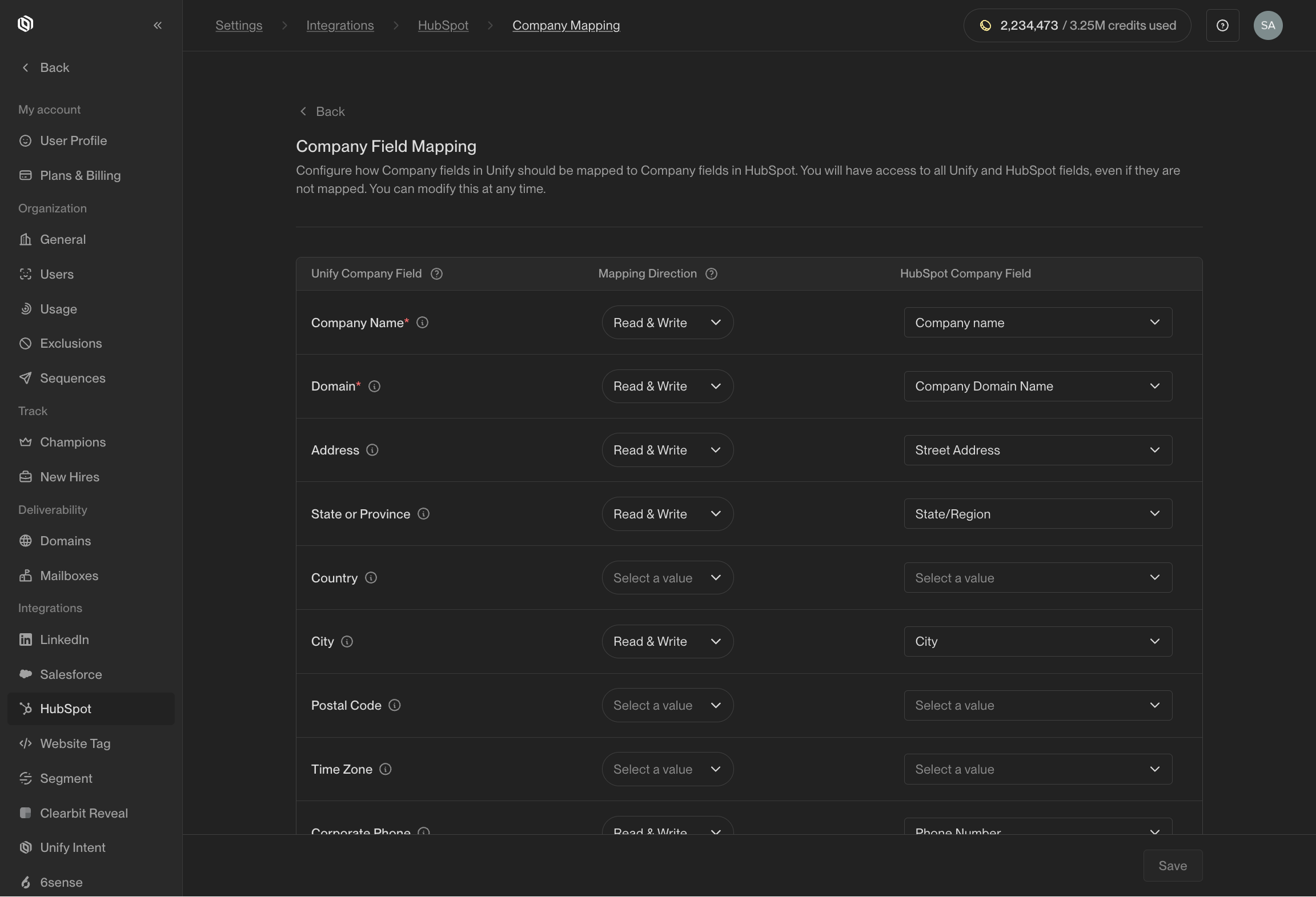 You can return to update these mappings any time in the future, so you don't
need to worry about getting them perfect right off the bat!
### (Optional) Create custom properties
You can write values to default properties and custom properties. To write to
custom properties, they must already exist in HubSpot.
While some of the fields Unify can write exist as standard properties in
HubSpot, many of them do not. In particular, Unify-specific fields (like the
name of the Sequence a person was enrolled in) do not exist in HubSpot by
default. To write these values to HubSpot, you will need to create custom
properties before mapping them.
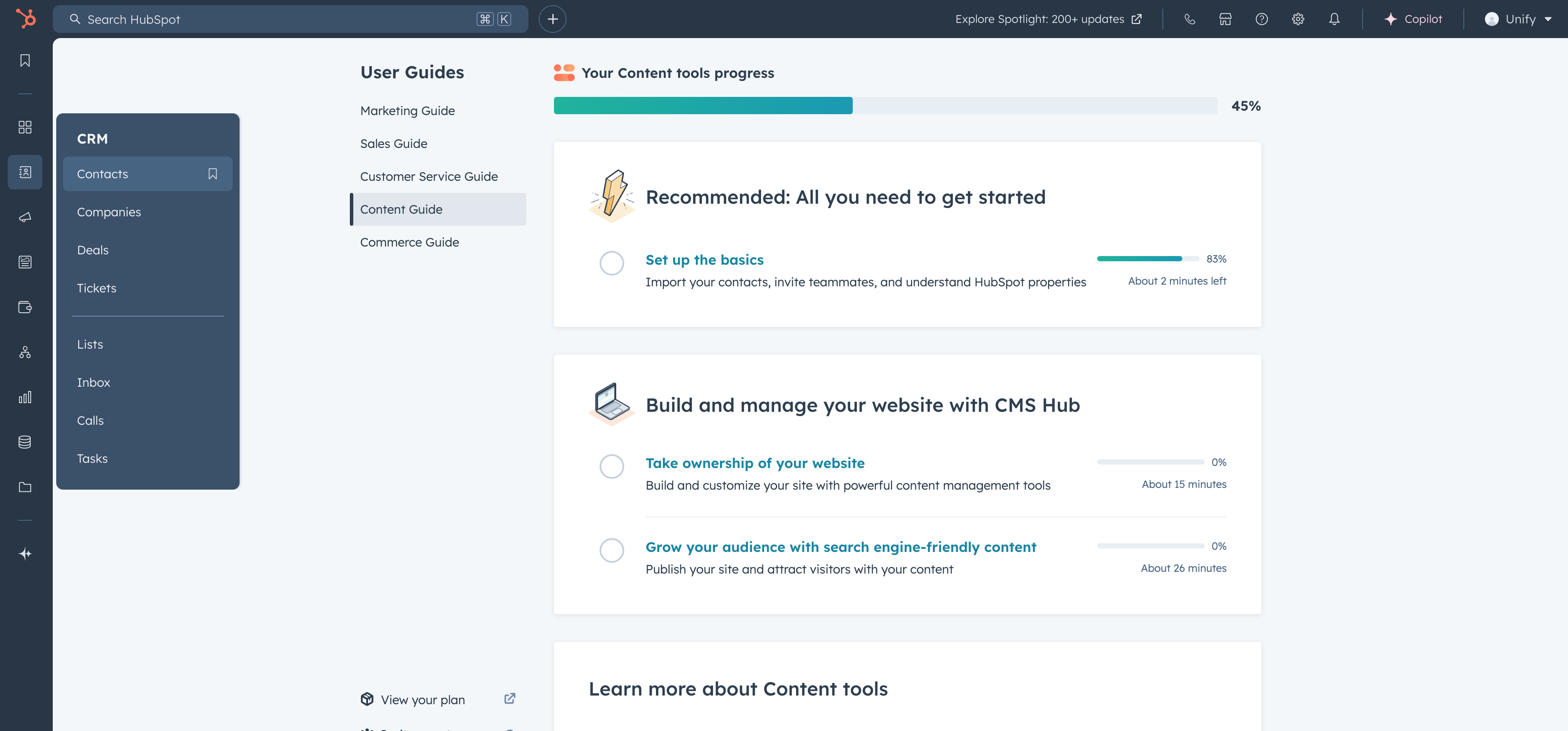
Here's what the process looks like for adding **Contact** properties. First, in
HubSpot, navigate to **CRM → Contacts**.
You can return to update these mappings any time in the future, so you don't
need to worry about getting them perfect right off the bat!
### (Optional) Create custom properties
You can write values to default properties and custom properties. To write to
custom properties, they must already exist in HubSpot.
While some of the fields Unify can write exist as standard properties in
HubSpot, many of them do not. In particular, Unify-specific fields (like the
name of the Sequence a person was enrolled in) do not exist in HubSpot by
default. To write these values to HubSpot, you will need to create custom
properties before mapping them.
Here's what the process looks like for adding **Contact** properties. First, in
HubSpot, navigate to **CRM → Contacts**.
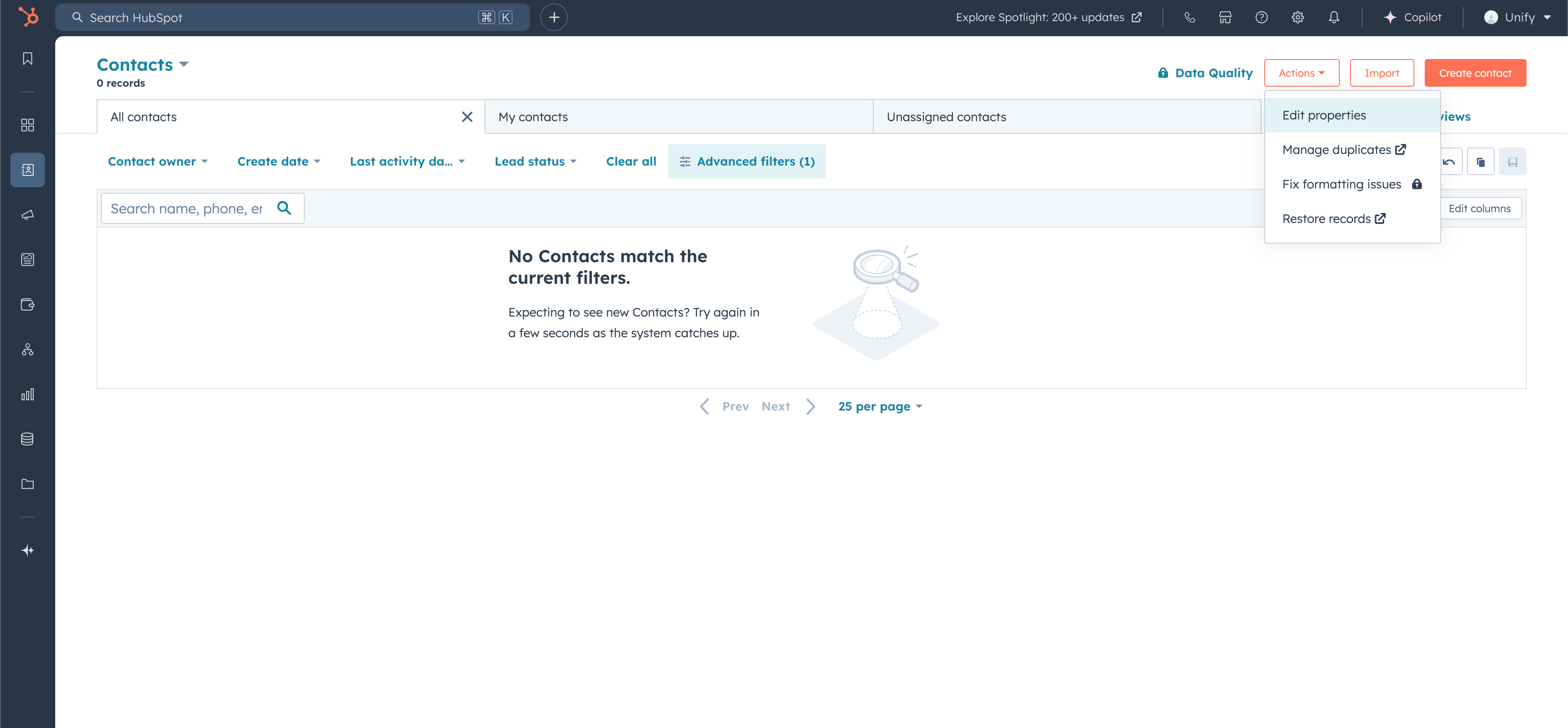
 Select **Actions → Edit properties**.
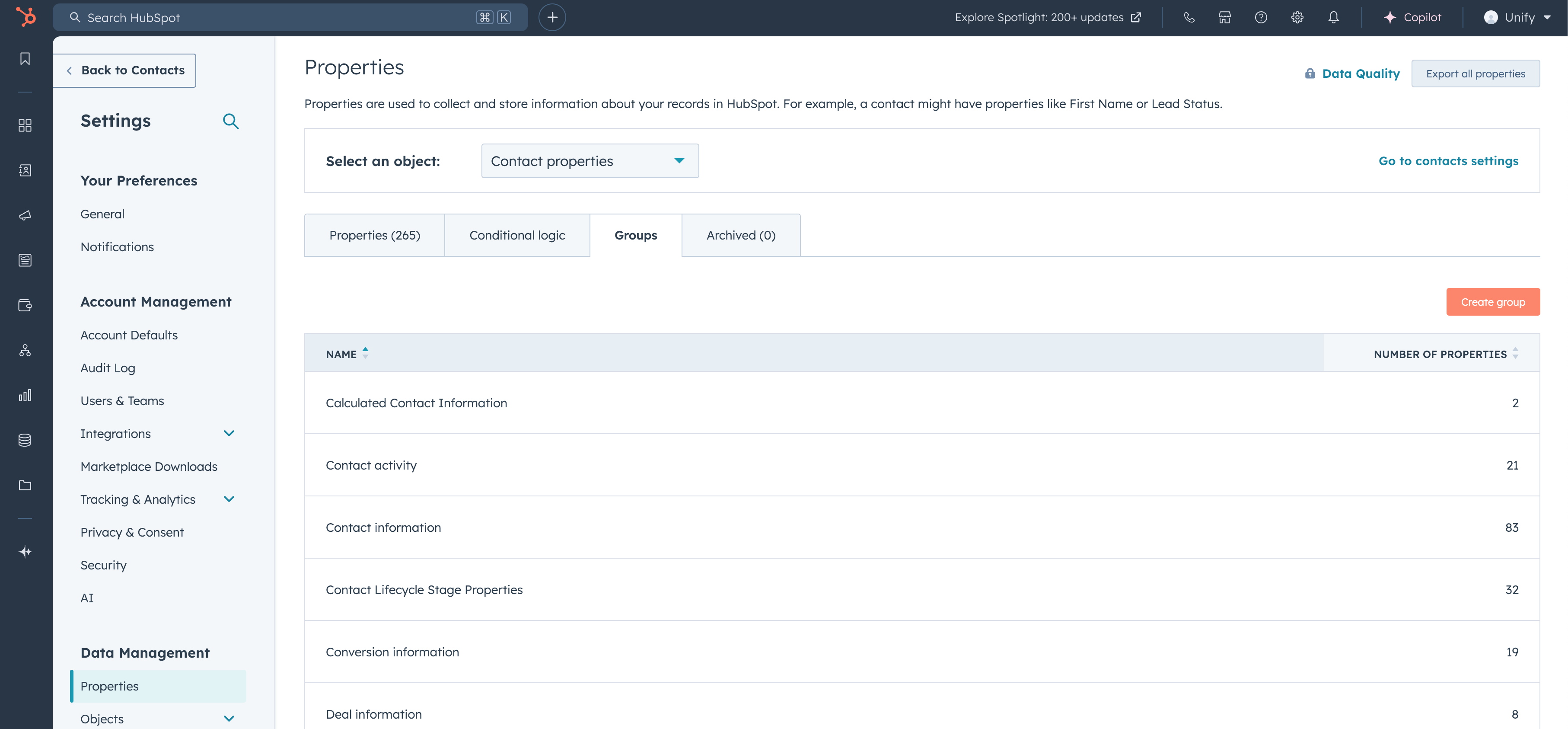
 Navigate to **Groups → Create group**.
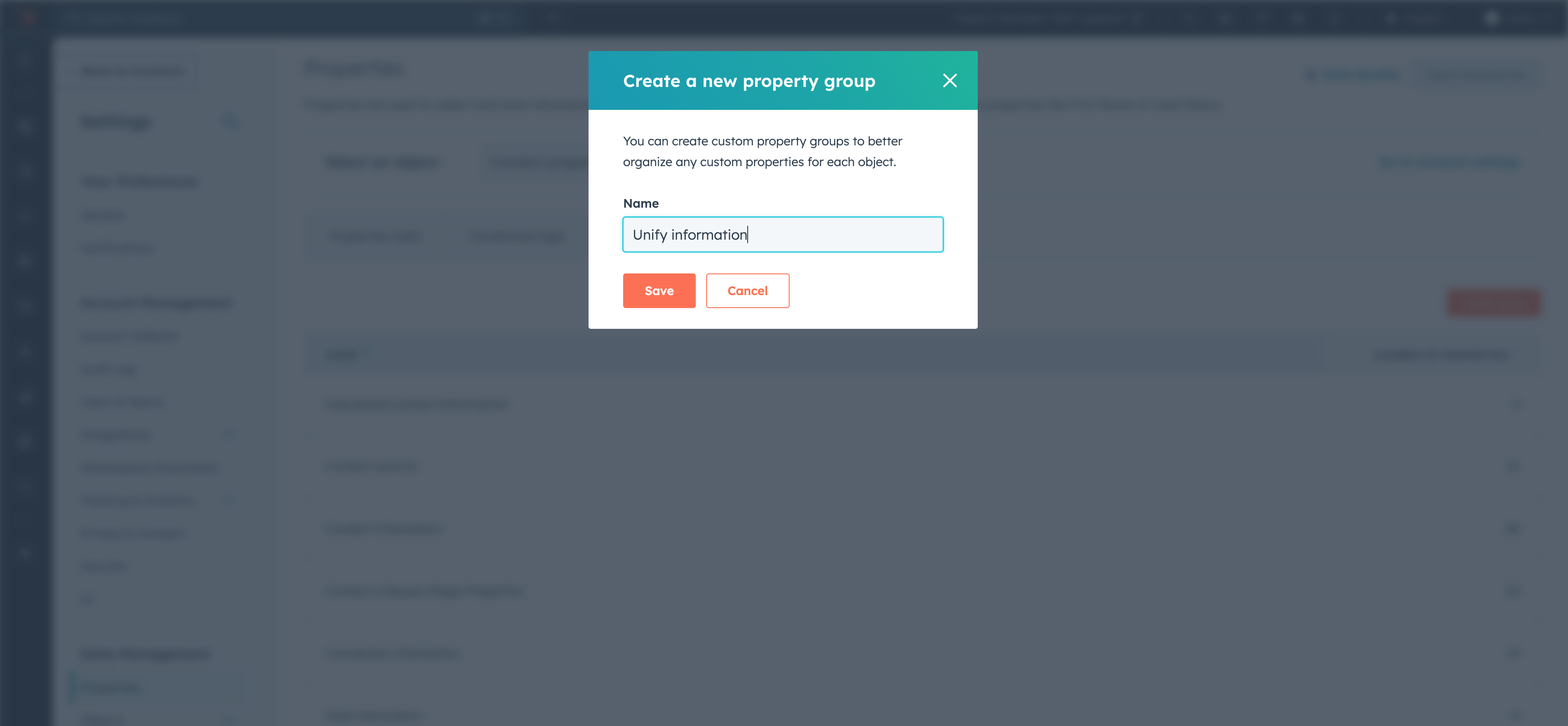
 Type in the name of the group (recommended title "Unify information") and click
**Create**.
Type in the name of the group (recommended title "Unify information") and click
**Create**.
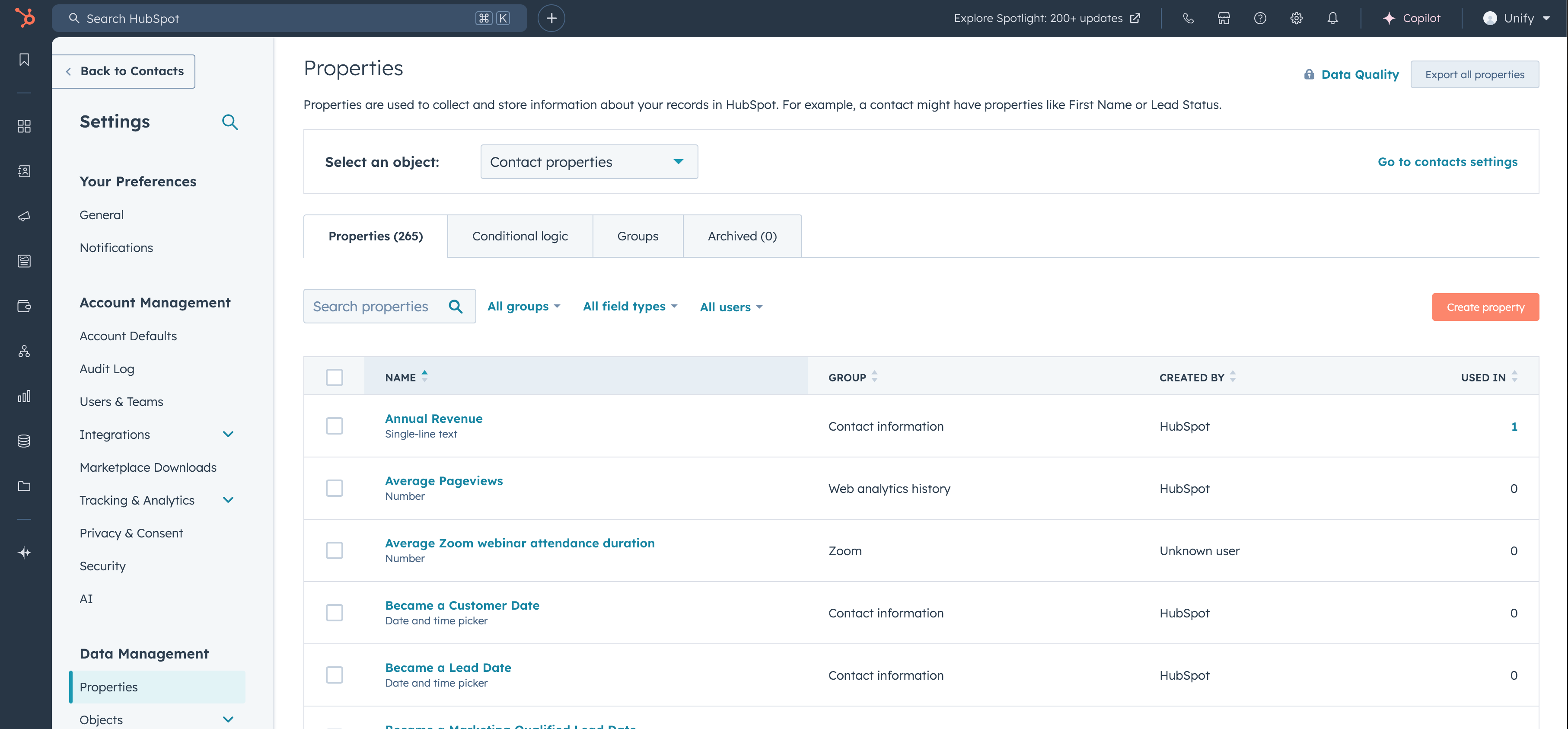
 Navigate to **Properties → Create property**.
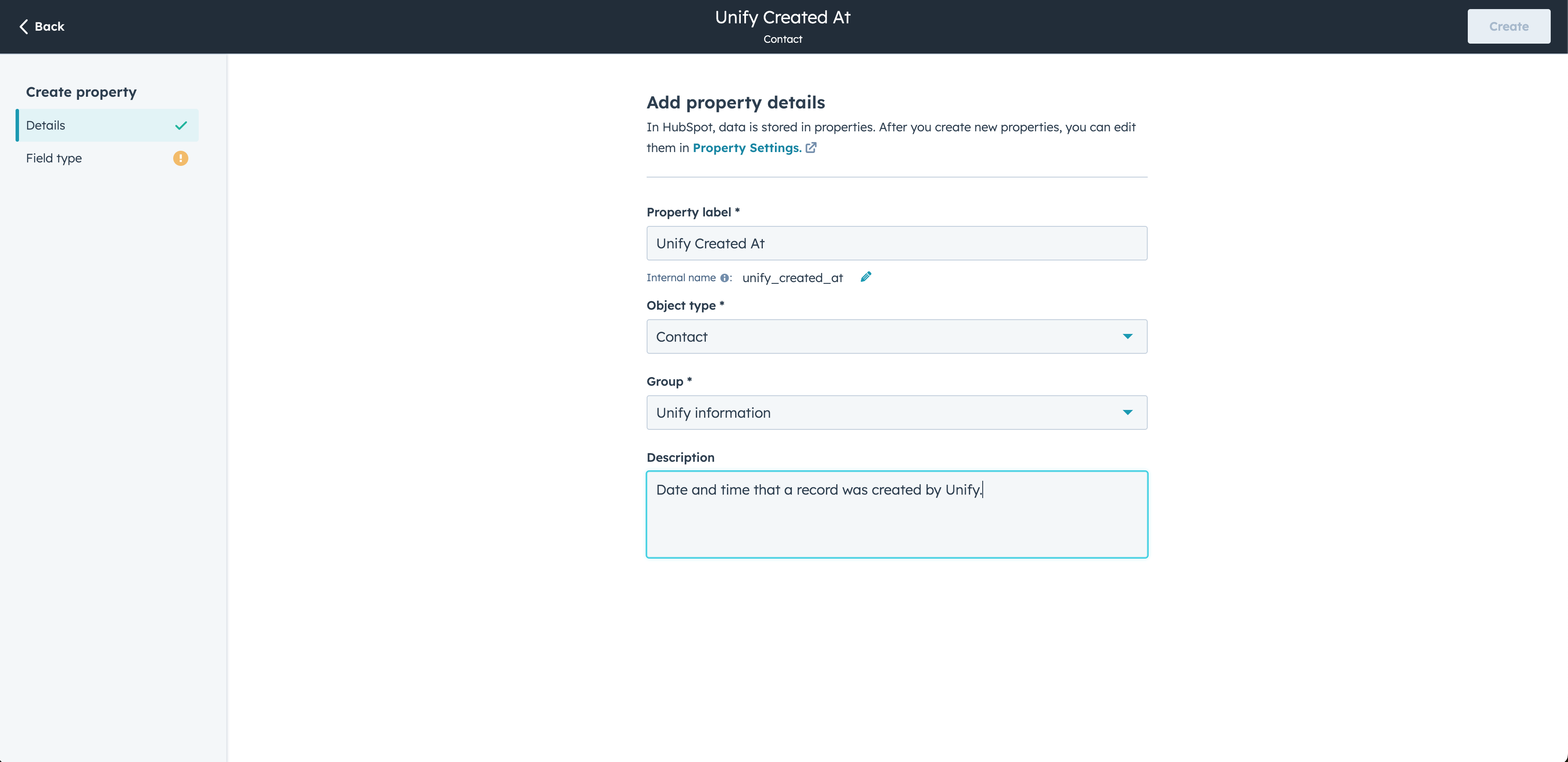
 When editing the property details, make sure the **Object type** is set properly
(in this case, to **Contact**) and the **Group** is set to the group you
created earlier. You can fill in the **Label** and **Description** as desired.
When editing the property details, make sure the **Object type** is set properly
(in this case, to **Contact**) and the **Group** is set to the group you
created earlier. You can fill in the **Label** and **Description** as desired.
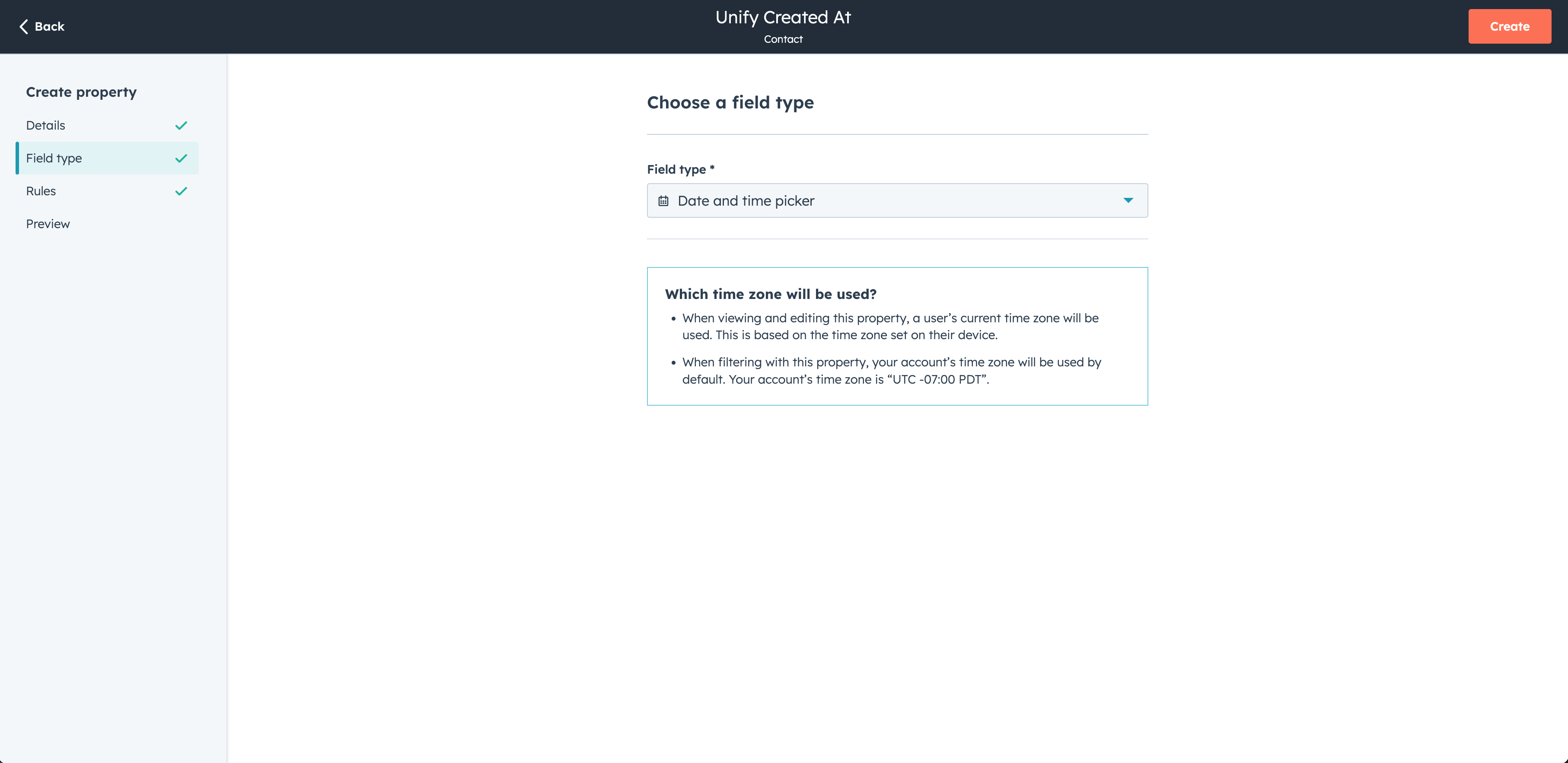
 Lastly, select the **Field type** and click **Create**.
 This is what your **Contact** properties filtered to your new group might look
like after you've added them:
This is what your **Contact** properties filtered to your new group might look
like after you've added them:
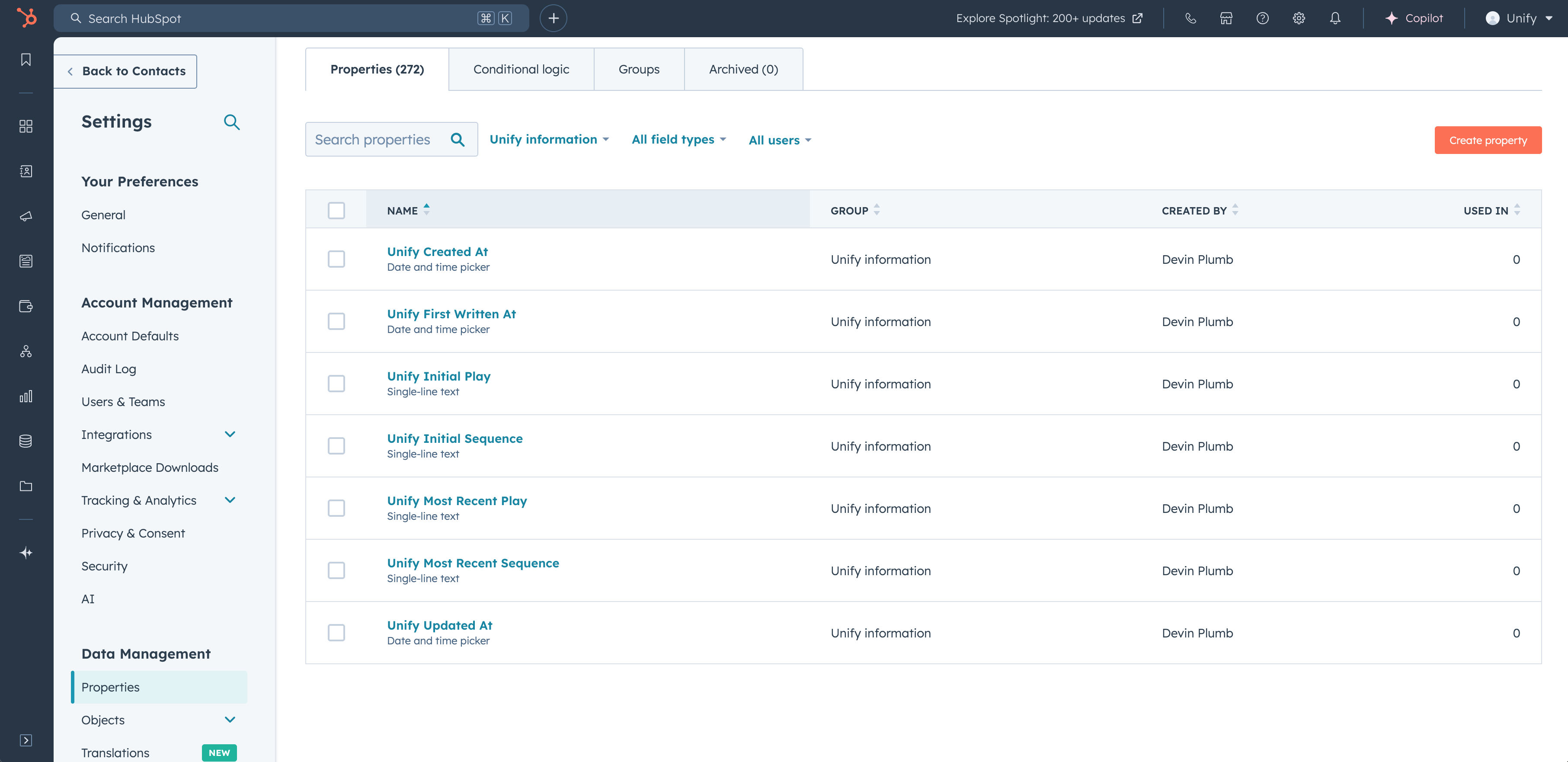 You can then repeat this process for **Company** properties as well.
## Available fields
Below is a full list of the values that can be configured in the field mappings
for each object type. Some of these are standard properties, while others
provide Unify-specific information, such as the name of the Sequence that a
person was enrolled in.
| Field | Description |
| -------------------------------------- | ----------------------------------------------------------------------------------------------------------------------------------------------------------------- |
| **Company Name**
You can then repeat this process for **Company** properties as well.
## Available fields
Below is a full list of the values that can be configured in the field mappings
for each object type. Some of these are standard properties, while others
provide Unify-specific information, such as the name of the Sequence that a
person was enrolled in.
| Field | Description |
| -------------------------------------- | ----------------------------------------------------------------------------------------------------------------------------------------------------------------- |
| **Company Name**
*Text* | Name of the company. |
| **Domain**
*Text* | Web domain of the company. |
| **Address**
*Text* | Physical address of the company. |
| **State or Province**
*Text* | State, province, region, or territory the company is located in. |
| **Country**
*Country* | Country the address is located in. |
| **City**
*Text* | City, town, or village the company is located in. |
| **Postal Code**
*Text* | Postal code for the company. |
| **Time Zone**
*Text* | Time zone the company is located in. |
| **Corporate Phone**
*Text* | Corporate phone number for the company. |
| **Status**
*Text* | Status of the company in the sales lifecycle. |
| **LinkedIn URL**
*Text* | URL to the company's LinkedIn page. |
| **Description**
*Text* | Description of the company. |
| **Do Not Contact**
*Boolean* | Flag indicating that the company should not be contacted. |
| **Founded**
*Date* | Date the company was founded. |
| **Industry**
*Text* | Industry the company is in. |
| **Employee Count**
*Number* | Approximate number of employees at the company. |
| **Revenue**
*Number* | Estimated annual revenue of the company. |
| **Revenue Currency**
*Text* | Three-letter ISO 4217 code indicating the revenue value currency type. |
| **Account Source**
*Text* | Channel this Company record was sourced from. |
| **Unify Metadata**
*Text* | A unique identifier useful for tracking records that Unify writes to. |
| **Unify Created At**
*Date* | Date and time the record was created by Unify. This will only be populated if Unify created the record; otherwise, it will remain empty. |
| **Unify Updated At**
*Date* | Date and time the record was last updated by Unify. |
| **Unify First Written At**
*Date* | Date and time the record was first written to by Unify. This will be populated when Unify first creates or updates the record, and it will not change after that. |
| **Unify Initial Play**
*Text* | Name of the first Unify Play that ran on this record. |
| **Unify Initial Play At**
*Date* | Date and time the first Unify Play ran on this record. |
| **Unify Most Recent Play**
*Text* | Name of the most recent Unify Play that ran on this record. |
| **Unify Intent Level**
*Text* | Intent level of the company (either **High**, **Medium**, **Low**, or **None**). |
| Field | Description |
| ------------------------------------------------------ | ----------------------------------------------------------------------------------------------------------------------------------------------------------------- |
| **Email**
*Text* | Contact email address. |
| **Address**
*Text* | Physical address of the person. |
| **Country**
*Country* | Country the address is located in. |
| **Postal Code**
*Text* | Postal code for the person. |
| **Email Opt Out**
*Boolean* | Indicates whether the person has opted out of receiving emails. |
| **Status**
*Text* | Status of the person in the sales lifecycle. |
| **First Name**
*Text* | First name of the contact. |
| **First Name Suffix**
*Text* | Suffix of the first name of the contact. |
| **Last Name**
*Text* | Last name of the contact. |
| **Title**
*Text* | Job title or position of the contact. |
| **Mobile Phone**
*Text* | Mobile phone number of the contact. |
| **Work Phone**
*Text* | Work phone number of the contact. |
| **Corporate Phone**
*Text* | Corporate phone number of the contact. |
| **LinkedIn URL**
*Text* | LinkedIn profile URL of the contact. |
| **Do Not Call**
*Boolean* | Indicates whether the contact should receive phone calls or not. |
| **Do Not Email**
*Boolean* | Indicates whether the contact should receive emails or not. |
| **EU Resident**
*Boolean* | Indicates whether the contact is a resident of the European Union. |
| **Lead Source**
*Text* | Channel this Person record was sourced from. |
| **Last Activity Date**
*Date* | Date of the last activity or engagement with the contact. |
| **Unify Metadata**
*Text* | A unique identifier useful for tracking records that Unify writes to. |
| **Unify Created At**
*Date* | Date and time the record was created by Unify. This will only be populated if Unify created the record; otherwise, it will remain empty. |
| **Unify Updated At**
*Date* | Date and time the record was last updated by Unify. |
| **Unify First Written At**
*Date* | Date and time the record was first written to by Unify. This will be populated when Unify first creates or updates the record, and it will not change after that. |
| **Unify Initial Play**
*Text* | Name of the first Unify Play that ran on this record. |
| **Unify Initial Play At**
*Date* | Date and time the first Unify Play ran on this record. |
| **Unify Most Recent Play**
*Text* | Name of the most recent Unify Play that ran on this record. |
| **Unify Most Recent Play At**
*Date* | Date and time the most recent Unify Play ran on this record. |
| **Unify Initial Sequence**
*Text* | Name of the first Unify Sequence this person was enrolled in. |
| **Unify Initial Sequence At**
*Date* | Date and time this person was first enrolled in a Unify Sequence. |
| **Unify Initial Sequence Step At**
*Date* | Date and time this person first completed a step in a Unify Sequence. |
| **Unify Most Recent Sequence**
*Text* | Name of the most recent Unify Sequence this person was enrolled in. |
| **Unify Most Recent Sequence At**
*Date* | Date and time this person was most recently enrolled in a Unify Sequence. |
| **Unify Most Recent Sequence Step At**
*Date* | Date and time this person most recently completed a step in a Unify Sequence. |
| **Unify Most Recent Sequence Status**
*Text* | Status of the most recent enrollment for this person. The statuses shown on enrollments in Unify are the same values that will be written to HubSpot. |
| **Unify Initial Reply Classification**
*Text* | High-level classification of the initial reply received from a person. It will be either "Positive", "Objection", "Neutral", "Automated", or "Negative". |
| **Unify Most Recent Reply Classification**
*Text* | High-level classification of the most recent reply received from a person. It will be either "Positive", "Objection", "Neutral", "Automated", or "Negative". |
| **Unify Initial Reply Tags**
*Text* | Comma-separated list of classification tags of the initial reply received from a person. For example, "Willing to Meet, Needs More Info". |
| **Unify Most Recent Reply Tags**
*Text* | Comma-separated list of classification tags of the most recent reply received from a person. For example, "Willing to Meet, Needs More Info". |